Payment Types
All riders need to pay their bus fare when riding Golden Gate Transit.
As of December 10, 2025, we now accept contactless bank cards in addition to Clipper cards (plastic and mobile) and cash.
New! Contactless Bank Card Payments
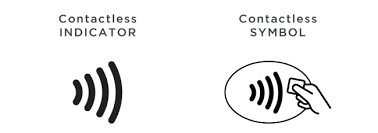
Transit riders can now pay adult fares using contactless credit or debit cards, or mobile payment methods such as Apple Pay and Google Pay on Golden Gate Transit.
Contactless bank card payments automatically default to the Clipper fare.
- Each rider must have their own contactless card or mobile wallet
- Contactless bank card payments are only good for adult Clipper fares. Youth, senior, disabled, Medicare, and Clipper START discounts are not available with contactless bank cards.
- Contactless bank cards must be chip-enabled and have the contactless symbol.
- Get charged correctly! Tap on AND off on Golden Gate Transit buses!
- If you have a Clipper card added to your mobile wallet, payments will default to your mobile Clipper card instead of your contactless bank card unless you disable Express Transit (iPhone) or remove the Clipper card (Android).
- Tap on and off with the same card/device.
- To ensure that the correct card gets charged, riders should remove their card from their wallet before tapping on.
Clipper Cards (Plastic and Mobile)
Each passenger needs their own Clipper account or plastic Clipper card. Tap on AND off on Golden Gate Transit buses!
- Green Light + 1 beep. Good to go.
- Yellow Light + 2 beeps. You are good to go, but your remaining balance is less than $2.
- Red Light + 3 beeps. Your card wasn’t accepted. Tap again or use another payment method.
New! How to Check Balances
Clipper readers no longer display your balance; however there are several ways to check.
- Log into the Clipper app or clippercard.com website
- Check your mobile wallet
- Tap card at a ticket vending machines (TVM)
- Call Clipper customer service at 877.878.8883
- To request a refund or adjustment or to report a lost or damaged card, visit the Clipper Customer Support webpage
How to Buy
- To purchase mobile cards or plastic cards, visit clippercard.com.
- For youth, senior, disabled (Clipper Access), and Clipper START cards, visit clippercard.com.
- Cards can be purchased in person at Golden Gate Transit Customer Service Center at the San Rafael Transit Center.
Cash
When boarding the bus, tell the driver your final destination so the appropriate fare can be charged.
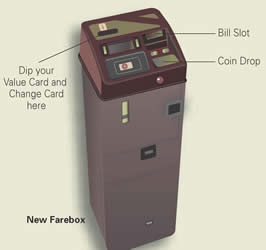
- Insert your cash and coins into the farebox.
- The farebox will not accept bills over $20.
- Bills should be flat and unfolded.
- Drop coins one at a time.
- Exact change is recommended as drivers do not give change.
- If you are due more than $1 in change, you will be issued a change card to use on future Golden Gate Transit trips. The value of the change card will be printed on the back.
Using a Change Card
Insert the change card in the activation slot on the top left of the farebox. The farebox will deduct the appropriate fare and the remaining balance will be printed on the back of the card. If the remaining balance on your change card is less than your appropriate fare, you can use up to three (3) change cards to pay your fare (insert the lowest balance card first) or you can combine change card(s) with cash to pay your fare. Change cards are non-refundable and not exchangeable.